
AI Colorizer
Pick a page from our library, one of your creations or your own line art, choose a color style, and the AI fills it with color while keeping every outline.
Example result
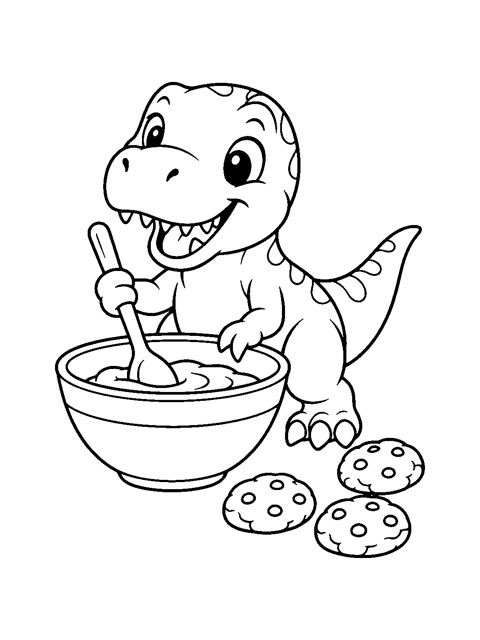
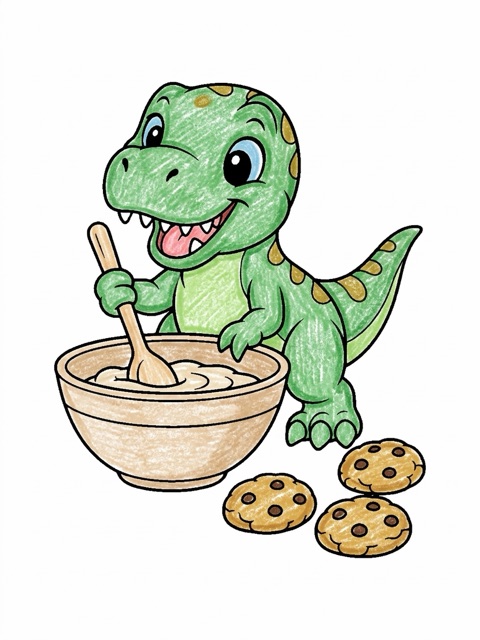
Real results from this tool on a page from our free library; change the color style to compare.
- 1Clean black outlines on white paper color best.
- 2Pages from our library and your own creations work great.
- 3Scans or photos of a printed page should be flat, sharp and well lit.
- 4Your outlines stay as they are, and so do photos, logos or colors already on the page; the AI only colors the line art.
How it works
How to color a page with AI
- 1
Choose a page
Open any page in the free library and choose Color with AI, pick one of your own creations, or upload a coloring page or line art drawing.
- 2
Pick a color style
Choose Crayon, Marker, Watercolor, Pastel, Storybook or Realistic. The two-credit cost is shown next to the button before you start.
- 3
Download your colored page
Your page comes back colored in about half a minute, next to the original, and is saved privately as a PNG.
Styles
Six color styles
- Crayon
- Playful crayon texture, like a page colored by hand.
- Marker
- Bright, bold colors with clean even fills.
- Watercolor
- Soft washes of color with gentle edges.
- Pastel
- Light, calm colors for a gentle look.
- Storybook
- Warm picture-book colors that feel cozy.
- Realistic
- Natural colors with soft pencil shading.
A colored version is a quick way to try color ideas before you pick up your own crayons or pencils, to show a child what a finished page can look like, or to make a bright picture for a card or a screen. Clean, closed outlines give the most even color; very busy or sketchy drawings can come back with a few areas colored differently than you expect.
Privacy
Your pages stay private
The page you color and the colored result are kept in private storage that only your account can open, and they are never added to the public library. Only upload drawings you have the right to use, and keep it family-friendly: see the Acceptable Use Policy and the Privacy Policy. Need a page to color first? Browse the free coloring page library, describe one to the AI coloring page generator or turn a photo into a coloring page.
FAQ
AI colorizer questions
How many credits does coloring a page cost?
Each colored page uses two credits. Credits are reserved when you submit and only charged when the colored page is ready, so a page that cannot be colored does not use any credits. New accounts get two free credits, enough for one colored page.
Which pages can I color?
Any page in our free coloring page library (open a page and choose Color with AI), any coloring page you made with our generator or photo tool, or your own line art. Uploads can be JPG, PNG or WebP files up to 10 MB and at least 256 pixels on the shorter side. Only upload drawings you made or have the right to use.
Will the AI change my drawing?
No. The AI only decides the colors: your page is split into its own enclosed areas, each area takes its colors from the AI's result, and your original outlines are laid on top, so every line on the page is yours. Anything the AI drew that your page doesn't have, such as an extra star, scales or a glow, takes the color around it, and small white areas like eyes that the AI filled with black stay white. If the AI changed the drawing a lot, we color it once more at no extra cost and use the better of the two results. If you choose Keep blank paper white, anything the AI paints on the open paper around your drawing, such as a ground, a table or a backdrop, goes back to white paper. Where the AI moved things around, a few areas can get an unexpected color: fix them in Touch up colors (free, no AI) with a click of the fill bucket, or with the brush where your drawing has no line between two parts; or open the AI's original coloring, whose lines may differ from yours. Coloring uses the usual two credits; only a page that could not be colored at all uses none.
What happens to photos, logos or colors already on my page?
They stay exactly as they are. When you upload a page, the parts that already have color, such as a photo, a logo, a brand color bar, a colored frame or areas someone has already colored, are found on the page itself, and the colored page keeps those pixels from your upload; only the black-and-white line art is colored. Touch up colors leaves them alone too. Black text and gray shading count as line art. If almost the whole picture is in color, as in a photo, it is not line art: turn it into a coloring page with the photo tool first, then color that page. No credits are used for a picture that is stopped this way.
Which AI model colors the page?
Pages are colored by Google’s Nano Banana 2 (Gemini 3.1 Flash Image) model through our image provider APIMart. Your page and every colored result are also checked by an automated content filter.
What do I get?
A colored PNG, about 900 by 1200 pixels for a portrait page, saved privately in My Creations, together with the AI's original coloring and, if you save one, your touched-up copy. It works well on screen, as a color reference while you color the printed page, or printed at a small size.